
How to manage conversation history in a ReAct Agent with Redis#
!!! info “Prerequisites” This guide assumes familiarity with the following:
- [Prebuilt create_react_agent](../create-react-agent)
- [Persistence](../../concepts/persistence)
- [Short-term Memory](../../concepts/memory/#short-term-memory)
- [Trimming Messages](https://python.langchain.com/docs/how_to/trim_messages/)
Message history can grow quickly and exceed LLM context window size, whether you’re building chatbots with many conversation turns or agentic systems with numerous tool calls. There are several strategies for managing the message history:
message trimming - remove first or last N messages in the history
summarization - summarize earlier messages in the history and replace them with a summary
custom strategies (e.g., message filtering, etc.)
To manage message history in create_react_agent, you need to define a pre_model_hook function or runnable that takes graph state an returns a state update:
Trimming example:
# highlight-next-line
from langchain_core.messages.utils import (
    # highlight-next-line
    trim_messages,
    # highlight-next-line
    count_tokens_approximately
# highlight-next-line
)
from langgraph.prebuilt import create_react_agent
from langgraph.checkpoint.redis import RedisSaver

# This function will be called every time before the node that calls LLM
def pre_model_hook(state):
    trimmed_messages = trim_messages(
        state["messages"],
        strategy="last",
        token_counter=count_tokens_approximately,
        max_tokens=384,
        start_on="human",
        end_on=("human", "tool"),
    )
    # You can return updated messages either under `llm_input_messages` or
    # `messages` key (see the note below)
    # highlight-next-line
    return {"llm_input_messages": trimmed_messages}

# Set up Redis connection for checkpointer
REDIS_URI = "redis://redis:6379"
checkpointer = None
with RedisSaver.from_conn_string(REDIS_URI) as cp:
    cp.setup()
    checkpointer = cp

agent = create_react_agent(
    model,
    tools,
    # highlight-next-line
    pre_model_hook=pre_model_hook,
    checkpointer=checkpointer,
)
Summarization example:
# highlight-next-line
from langmem.short_term import SummarizationNode
from langchain_core.messages.utils import count_tokens_approximately
from langgraph.prebuilt.chat_agent_executor import AgentState
from langgraph.checkpoint.redis import RedisSaver
from typing import Any

model = ChatOpenAI(model="gpt-4o")

summarization_node = SummarizationNode(
    token_counter=count_tokens_approximately,
    model=model,
    max_tokens=384,
    max_summary_tokens=128,
    output_messages_key="llm_input_messages",
)

class State(AgentState):
    # NOTE: we're adding this key to keep track of previous summary information
    # to make sure we're not summarizing on every LLM call
    # highlight-next-line
    context: dict[str, Any]

# Set up Redis connection for checkpointer
REDIS_URI = "redis://redis:6379"
checkpointer = None
with RedisSaver.from_conn_string(REDIS_URI) as cp:
    cp.setup()
    checkpointer = cp

graph = create_react_agent(
    model,
    tools,
    # highlight-next-line
    pre_model_hook=summarization_node,
    # highlight-next-line
    state_schema=State,
    checkpointer=checkpointer,
)
!!! Important
* To **keep the original message history unmodified** in the graph state and pass the updated history **only as the input to the LLM**, return updated messages under `llm_input_messages` key
* To **overwrite the original message history** in the graph state with the updated history, return updated messages under `messages` key

To overwrite the `messages` key, you need to do the following:

```python
from langchain_core.messages import RemoveMessage
from langgraph.graph.message import REMOVE_ALL_MESSAGES

def pre_model_hook(state):
    updated_messages = ...
    return {
        "messages": [RemoveMessage(id=REMOVE_ALL_MESSAGES), *updated_messages]
        ...
    }
```
Setup#
First, let’s install the required packages and set our API keys
# IMPORTANT: Clear Redis to remove old checkpoints created with buggy serializer
import redis
r = redis.Redis(host="redis", port=6379, decode_responses=False)
r.flushdb()
print("Redis flushed - ready for fresh execution")
Redis flushed - ready for fresh execution
%%capture --no-stderr
%pip install -U langgraph langchain-openai "httpx>=0.24.0,<1.0.0"
import getpass
import os


def _set_env(var: str):
    if not os.environ.get(var):
        value = getpass.getpass(f"{var}: ")
        if value.strip():
            os.environ[var] = value


# Try to set OpenAI API key
_set_env("OPENAI_API_KEY")
Keep the original message history unmodified#
Let’s build a ReAct agent with a step that manages the conversation history: when the length of the history exceeds a specified number of tokens, we will call trim_messages utility that that will reduce the history while satisfying LLM provider constraints.
There are two ways that the updated message history can be applied inside ReAct agent:
Keep the original message history unmodified in the graph state and pass the updated history only as the input to the LLM
Overwrite the original message history in the graph state with the updated history
Let’s start by implementing the first one. We’ll need to first define model and tools for our agent:
from langchain_openai import ChatOpenAI

model = ChatOpenAI(model="gpt-4o", temperature=0)


def get_weather(location: str) -> str:
    """Use this to get weather information."""
    if any([city in location.lower() for city in ["nyc", "new york city"]]):
        return "It might be cloudy in nyc, with a chance of rain and temperatures up to 80 degrees."
    elif any([city in location.lower() for city in ["sf", "san francisco"]]):
        return "It's always sunny in sf"
    else:
        return f"I am not sure what the weather is in {location}"


tools = [get_weather]
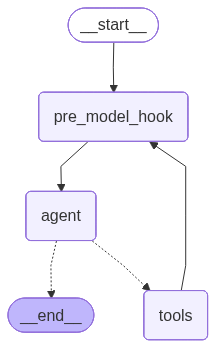
Now let’s implement pre_model_hook — a function that will be added as a new node and called every time before the node that calls the LLM (the agent node).
Our implementation will wrap the trim_messages call and return the trimmed messages under llm_input_messages. This will keep the original message history unmodified in the graph state and pass the updated history only as the input to the LLM
from langgraph.prebuilt import create_react_agent
from langgraph.checkpoint.redis import RedisSaver

# highlight-next-line
from langchain_core.messages.utils import (
    # highlight-next-line
    trim_messages,
    # highlight-next-line
    count_tokens_approximately,
    # highlight-next-line
)


# This function will be added as a new node in ReAct agent graph
# that will run every time before the node that calls the LLM.
# The messages returned by this function will be the input to the LLM.
def pre_model_hook(state):
    trimmed_messages = trim_messages(
        state["messages"],
        strategy="last",
        token_counter=count_tokens_approximately,
        max_tokens=384,
        start_on="human",
        end_on=("human", "tool"),
    )
    # highlight-next-line
    return {"llm_input_messages": trimmed_messages}


# Set up Redis connection for checkpointer
REDIS_URI = "redis://redis:6379"
checkpointer = None
with RedisSaver.from_conn_string(REDIS_URI) as cp:
    cp.setup()
    checkpointer = cp

graph = create_react_agent(
    model,
    tools,
    # highlight-next-line
    pre_model_hook=pre_model_hook,
    checkpointer=checkpointer,
)
00:25:07 langgraph.checkpoint.redis INFO Redis client is a standalone client
/tmp/ipykernel_1893/1628370867.py:37: LangGraphDeprecatedSinceV10: create_react_agent has been moved to `langchain.agents`. Please update your import to `from langchain.agents import create_agent`. Deprecated in LangGraph V1.0 to be removed in V2.0.
  graph = create_react_agent(
from IPython.display import display, Image

display(Image(graph.get_graph().draw_mermaid_png()))
We’ll also define a utility to render the agent outputs nicely:
def print_stream(stream, output_messages_key="llm_input_messages"):
    for chunk in stream:
        for node, update in chunk.items():
            print(f"Update from node: {node}")
            messages_key = (
                output_messages_key if node == "pre_model_hook" else "messages"
            )
            for message in update[messages_key]:
                if isinstance(message, tuple):
                    print(message)
                else:
                    message.pretty_print()

        print("\n\n")
Now let’s run the agent with a few different queries to reach the specified max tokens limit:
config = {"configurable": {"thread_id": "trim-example-1"}}

inputs = {"messages": [("user", "What's the weather in NYC?")]}
result = graph.invoke(inputs, config=config)

inputs = {"messages": [("user", "What's it known for?")]}
result = graph.invoke(inputs, config=config)
00:25:08 httpx INFO   HTTP Request: POST https://api.openai.com/v1/chat/completions "HTTP/1.1 200 OK"
00:25:09 httpx INFO   HTTP Request: POST https://api.openai.com/v1/chat/completions "HTTP/1.1 200 OK"
00:25:13 httpx INFO   HTTP Request: POST https://api.openai.com/v1/chat/completions "HTTP/1.1 200 OK"
Let’s see how many tokens we have in the message history so far:
messages = result["messages"]
count_tokens_approximately(messages)
441
You can see that we are close to the max_tokens threshold, so on the next invocation we should see pre_model_hook kick-in and trim the message history. Let’s run it again:
inputs = {"messages": [("user", "where can i find the best bagel?")]}
print_stream(graph.stream(inputs, config=config, stream_mode="updates"))
Update from node: pre_model_hook
================================ Human Message =================================

What's it known for?
================================== Ai Message ==================================

New York City is known for a variety of iconic landmarks, cultural institutions, and vibrant neighborhoods. Some of the most notable features include:

1. **Statue of Liberty**: A symbol of freedom and democracy, located on Liberty Island.
2. **Times Square**: Known for its bright lights, Broadway theaters, and bustling atmosphere.
3. **Central Park**: A large public park offering a natural oasis amidst the urban environment.
4. **Empire State Building**: An iconic skyscraper offering panoramic views of the city.
5. **Broadway**: Famous for its world-class theater productions.
6. **Wall Street**: The financial hub of the United States.
7. **Museums**: Including the Metropolitan Museum of Art, Museum of Modern Art (MoMA), and the American Museum of Natural History.
8. **Diverse Cuisine**: A melting pot of cultures reflected in its diverse food scene, from street food to Michelin-starred restaurants.
9. **Cultural Diversity**: A rich tapestry of cultures and communities, making it one of the most diverse cities in the world.
10. **Fashion**: A global fashion capital, hosting events like New York Fashion Week.

These are just a few highlights of what makes New York City a unique and exciting place to visit or live.
================================ Human Message =================================

where can i find the best bagel?


00:25:21 httpx INFO   HTTP Request: POST https://api.openai.com/v1/chat/completions "HTTP/1.1 200 OK"
Update from node: agent
================================== Ai Message ==================================

Finding the "best" bagel in New York City can be subjective, as it often depends on personal taste preferences. However, several bagel shops are frequently mentioned as top contenders for the best bagels in the city:

1. **Ess-a-Bagel**: Known for its large, chewy bagels and a wide variety of spreads and toppings.
2. **Russ & Daughters**: Famous for its traditional bagels and high-quality smoked fish.
3. **Absolute Bagels**: A favorite on the Upper West Side, known for its fresh and fluffy bagels.
4. **Murray’s Bagels**: Offers a classic New York bagel experience with a no-toasting policy to preserve freshness.
5. **Tompkins Square Bagels**: Known for its creative cream cheese flavors and hearty bagels.
6. **Bagel Hole**: A small shop in Park Slope, Brooklyn, known for its dense and flavorful bagels.
7. **Leo’s Bagels**: Offers a wide variety of bagels and toppings, known for its quality and taste.

These spots are beloved by locals and visitors alike, and each offers a unique take on the classic New York bagel.
You can see that the pre_model_hook node now only returned the last 3 messages, as expected. However, the existing message history is untouched:
updated_messages = graph.get_state(config).values["messages"]
assert [(m.type, m.content) for m in updated_messages[: len(messages)]] == [
    (m.type, m.content) for m in messages
]
Overwrite the original message history#
Let’s now change the pre_model_hook to overwrite the message history in the graph state. To do this, we’ll return the updated messages under messages key. We’ll also include a special RemoveMessage(REMOVE_ALL_MESSAGES) object, which tells create_react_agent to remove previous messages from the graph state:
from langchain_core.messages import RemoveMessage
from langgraph.graph.message import REMOVE_ALL_MESSAGES


def pre_model_hook(state):
    trimmed_messages = trim_messages(
        state["messages"],
        strategy="last",
        token_counter=count_tokens_approximately,
        max_tokens=384,
        start_on="human",
        end_on=("human", "tool"),
    )
    # NOTE that we're now returning the messages under the `messages` key
    # We also remove the existing messages in the history to ensure we're overwriting the history
    # highlight-next-line
    return {"messages": [RemoveMessage(REMOVE_ALL_MESSAGES)] + trimmed_messages}


# Set up Redis connection for checkpointer
REDIS_URI = "redis://redis:6379"
checkpointer = None
with RedisSaver.from_conn_string(REDIS_URI) as cp:
    cp.setup()
    checkpointer = cp

graph = create_react_agent(
    model,
    tools,
    # highlight-next-line
    pre_model_hook=pre_model_hook,
    checkpointer=checkpointer,
)
00:25:21 langgraph.checkpoint.redis INFO   Redis client is a standalone client
00:25:21 redisvl.index.index INFO   Index already exists, not overwriting.
00:25:21 redisvl.index.index INFO   Index already exists, not overwriting.
00:25:21 redisvl.index.index INFO   Index already exists, not overwriting.
/tmp/ipykernel_1893/2986813568.py:27: LangGraphDeprecatedSinceV10: create_react_agent has been moved to `langchain.agents`. Please update your import to `from langchain.agents import create_agent`. Deprecated in LangGraph V1.0 to be removed in V2.0.
  graph = create_react_agent(
Now let’s run the agent with the same queries as before:
config = {"configurable": {"thread_id": "trim-example-2"}}

inputs = {"messages": [("user", "What's the weather in NYC?")]}
result = graph.invoke(inputs, config=config)

inputs = {"messages": [("user", "What's it known for?")]}
result = graph.invoke(inputs, config=config)
messages = result["messages"]

inputs = {"messages": [("user", "where can i find the best bagel?")]}
print_stream(
    graph.stream(inputs, config=config, stream_mode="updates"),
    output_messages_key="messages",
)
00:25:22 httpx INFO   HTTP Request: POST https://api.openai.com/v1/chat/completions "HTTP/1.1 200 OK"
00:25:22 httpx INFO   HTTP Request: POST https://api.openai.com/v1/chat/completions "HTTP/1.1 200 OK"
00:25:28 httpx INFO   HTTP Request: POST https://api.openai.com/v1/chat/completions "HTTP/1.1 200 OK"
Update from node: pre_model_hook
================================ Remove Message ================================


================================ Human Message =================================

What's it known for?
================================== Ai Message ==================================

New York City is known for a variety of iconic landmarks, cultural institutions, and vibrant neighborhoods. Some of the most notable features include:

1. **Statue of Liberty**: A symbol of freedom and democracy, located on Liberty Island.
2. **Times Square**: Known for its bright lights, Broadway theaters, and bustling atmosphere.
3. **Central Park**: A large public park offering a natural oasis amidst the urban environment.
4. **Empire State Building**: An iconic skyscraper offering panoramic views of the city.
5. **Broadway**: Famous for its world-class theater productions and musicals.
6. **Wall Street**: The financial hub of the United States, located in the Financial District.
7. **Museums**: Including the Metropolitan Museum of Art, Museum of Modern Art (MoMA), and the American Museum of Natural History.
8. **Diverse Cuisine**: A melting pot of cultures, offering a wide range of international foods.
9. **Cultural Diversity**: Known for its diverse population and vibrant cultural scene.
10. **Brooklyn Bridge**: An iconic suspension bridge connecting Manhattan and Brooklyn.

These are just a few highlights of what makes New York City a unique and exciting place to visit or live.
================================ Human Message =================================

where can i find the best bagel?


00:25:34 httpx INFO   HTTP Request: POST https://api.openai.com/v1/chat/completions "HTTP/1.1 200 OK"
Update from node: agent
================================== Ai Message ==================================

New York City is famous for its bagels, and there are several places renowned for serving some of the best. Here are a few top spots where you can find delicious bagels in NYC:

1. **Ess-a-Bagel**: Known for their large, chewy bagels with a variety of spreads and toppings. Locations in Midtown and Gramercy.

2. **Russ & Daughters**: A historic appetizing store on the Lower East Side, famous for its bagels with lox and cream cheese.

3. **Absolute Bagels**: Located on the Upper West Side, this spot is popular for its fresh, fluffy bagels.

4. **Murray’s Bagels**: Known for their traditional, hand-rolled bagels. Located in Greenwich Village.

5. **Tompkins Square Bagels**: Offers a wide selection of bagels and creative cream cheese flavors. Located in the East Village.

6. **Bagel Hole**: A small shop in Park Slope, Brooklyn, known for its classic New York-style bagels.

7. **Leo’s Bagels**: Located in the Financial District, offering a variety of bagels and toppings.

Each of these places has its own unique style and flavor, so it might be worth trying a few to find your personal favorite!
You can see that the pre_model_hook node returned the last 3 messages again. However, this time, the message history is modified in the graph state as well:
updated_messages = graph.get_state(config).values["messages"]
assert (
    # First 2 messages in the new history are the same as last 2 messages in the old
        [(m.type, m.content) for m in updated_messages[:2]]
        == [(m.type, m.content) for m in messages[-2:]]
)
Summarizing message history#
%%capture --no-stderr
%pip install -U langmem
Finally, let’s apply a different strategy for managing message history — summarization. Just as with trimming, you can choose to keep original message history unmodified or overwrite it. The example below will only show the former.
We will use the SummarizationNode from the prebuilt langmem library. Once the message history reaches the token limit, the summarization node will summarize earlier messages to make sure they fit into max_tokens.
# highlight-next-line
from langmem.short_term import SummarizationNode
from langgraph.prebuilt.chat_agent_executor import AgentState
from langgraph.checkpoint.redis import RedisSaver
from typing import Any

model = ChatOpenAI(model="gpt-4o")
summarization_model = model.bind(max_tokens=128)

summarization_node = SummarizationNode(
    token_counter=count_tokens_approximately,
    model=summarization_model,
    max_tokens=384,
    max_summary_tokens=128,
    output_messages_key="llm_input_messages",
)


class State(AgentState):
    # NOTE: we're adding this key to keep track of previous summary information
    # to make sure we're not summarizing on every LLM call
    # highlight-next-line
    context: dict[str, Any]


# Set up Redis connection for checkpointer
REDIS_URI = "redis://redis:6379"
checkpointer = None
with RedisSaver.from_conn_string(REDIS_URI) as cp:
    cp.setup()
    checkpointer = cp

graph = create_react_agent(
    # limit the output size to ensure consistent behavior
    model.bind(max_tokens=256),
    tools,
    # highlight-next-line
    pre_model_hook=summarization_node,
    # highlight-next-line
    state_schema=State,
    checkpointer=checkpointer,
)
00:25:35 langgraph.checkpoint.redis INFO   Redis client is a standalone client
00:25:35 redisvl.index.index INFO   Index already exists, not overwriting.
00:25:35 redisvl.index.index INFO   Index already exists, not overwriting.
00:25:35 redisvl.index.index INFO   Index already exists, not overwriting.
/tmp/ipykernel_1893/3065461601.py:33: LangGraphDeprecatedSinceV10: create_react_agent has been moved to `langchain.agents`. Please update your import to `from langchain.agents import create_agent`. Deprecated in LangGraph V1.0 to be removed in V2.0.
  graph = create_react_agent(
config = {"configurable": {"thread_id": "summarization-example"}}
inputs = {"messages": [("user", "What's the weather in NYC?")]}

result = graph.invoke(inputs, config=config)

inputs = {"messages": [("user", "What's it known for?")]}
result = graph.invoke(inputs, config=config)

inputs = {"messages": [("user", "where can i find the best bagel?")]}
print_stream(graph.stream(inputs, config=config, stream_mode="updates"))
00:25:36 httpx INFO   HTTP Request: POST https://api.openai.com/v1/chat/completions "HTTP/1.1 200 OK"
00:25:38 httpx INFO   HTTP Request: POST https://api.openai.com/v1/chat/completions "HTTP/1.1 200 OK"
00:25:47 httpx INFO   HTTP Request: POST https://api.openai.com/v1/chat/completions "HTTP/1.1 200 OK"
/home/jupyter/venv/lib/python3.11/site-packages/langmem/short_term/summarization.py:246: RuntimeWarning: Failed to trim messages to fit within max_tokens limit before summarization - falling back to the original message list. This may lead to exceeding the context window of the summarization LLM.
  warnings.warn(
00:25:50 httpx INFO   HTTP Request: POST https://api.openai.com/v1/chat/completions "HTTP/1.1 200 OK"
Update from node: pre_model_hook
================================ System Message ================================

Summary of the conversation so far: In our conversation, you initially inquired about the current weather in New York City, and it was noted that it might be cloudy with a chance of rain and temperatures up to 80 degrees. You then asked what NYC is known for, and I provided a list of key features and attractions, including the Statue of Liberty, Times Square, Broadway, Central Park, the Empire State Building, Wall Street, its diverse culture and cuisine, world-class museums, unique neighborhoods, and significant historic sites.
================================ Human Message =================================

where can i find the best bagel?


00:25:56 httpx INFO   HTTP Request: POST https://api.openai.com/v1/chat/completions "HTTP/1.1 200 OK"
Update from node: agent
================================== Ai Message ==================================

New York City is famous for its delicious bagels, and you can find some of the best in various neighborhoods across the city. Here are a few top spots to check out for an amazing bagel:

1. **Ess-a-Bagel**: Known for its large, chewy bagels and generous cream cheese spreads, Ess-a-Bagel is a classic NYC bagel shop with locations in Manhattan.

2. **Russ & Daughters**: This iconic Jewish deli has been serving New Yorkers since 1914. They offer a range of traditional bagels with high-quality toppings like smoked fish and cream cheese.

3. **Bagel Hole**: Located in Brooklyn, Bagel Hole is known for its authentic, no-frills bagels that are often described as perfectly balanced – not too dense, not too fluffy.

4. **Murray's Bagels**: Found in Greenwich Village, Murray's Bagels doesn’t toast their bagels, but their fresh and flavorful offerings make up for it. They have a wide variety of bagels and spreads.

5. **Tompkins Square Bagels**: This spot in the East Village is famous for its creative cream cheese flavors, like sriracha or cannoli, along with its fresh, hand-rolled bagels.

6. **Absolute Bagels**: Located on the Upper West Side, Absolute Bagels is loved for their freshly baked bagels and diverse selection of toppings.

These are just a few of the beloved bagel spots in NYC, offering a variety of flavors, textures, and toppings to satisfy any bagel enthusiast.
You can see that the earlier messages have now been replaced with the summary of the earlier conversation!