Enhanced Mapping of Java Objects to Hashes
Introduction
The Spring Data Redis (SDR) framework makes it easy to write Spring applications that use the Redis as a store for Java objects (POJOs) by eliminating the redundant tasks and boilerplate code required for interacting with the store through Spring’s excellent infrastructure support.
Redis OM Spring, builds on top of SDR to improve and optimize the interaction with Redis by leveraging
Redis' rich module ecosystem. For Java objects mapped with SDR's @RedisHash annotation we enhance the
object-mapping by:
- Eliminating the need for client-side maintained secondary indices and instead using Redis' native Search and Query engine.
- Implementing dynamic repository finders with fast and flexible querying
- Using ULIDs instead of traditional UUIDs for performance, readability and interoperability
What You Will build
You will build an application that stores User POJOs (Plain Old Java Objects) as Redis Hashes.
What You need
- About 15 minutes
- A favorite text editor or IDE
- JDK 11 or later
- Gradle 4+ or Maven 3.2+
- Docker / Docker Compose
Starting with Spring Initializr
We'll start by creating a base SpringBoot application using the Spring Initializr. You can use this pre-initialized project and click Generate to download a ZIP file. This project is configured to fit the examples in this tutorial.
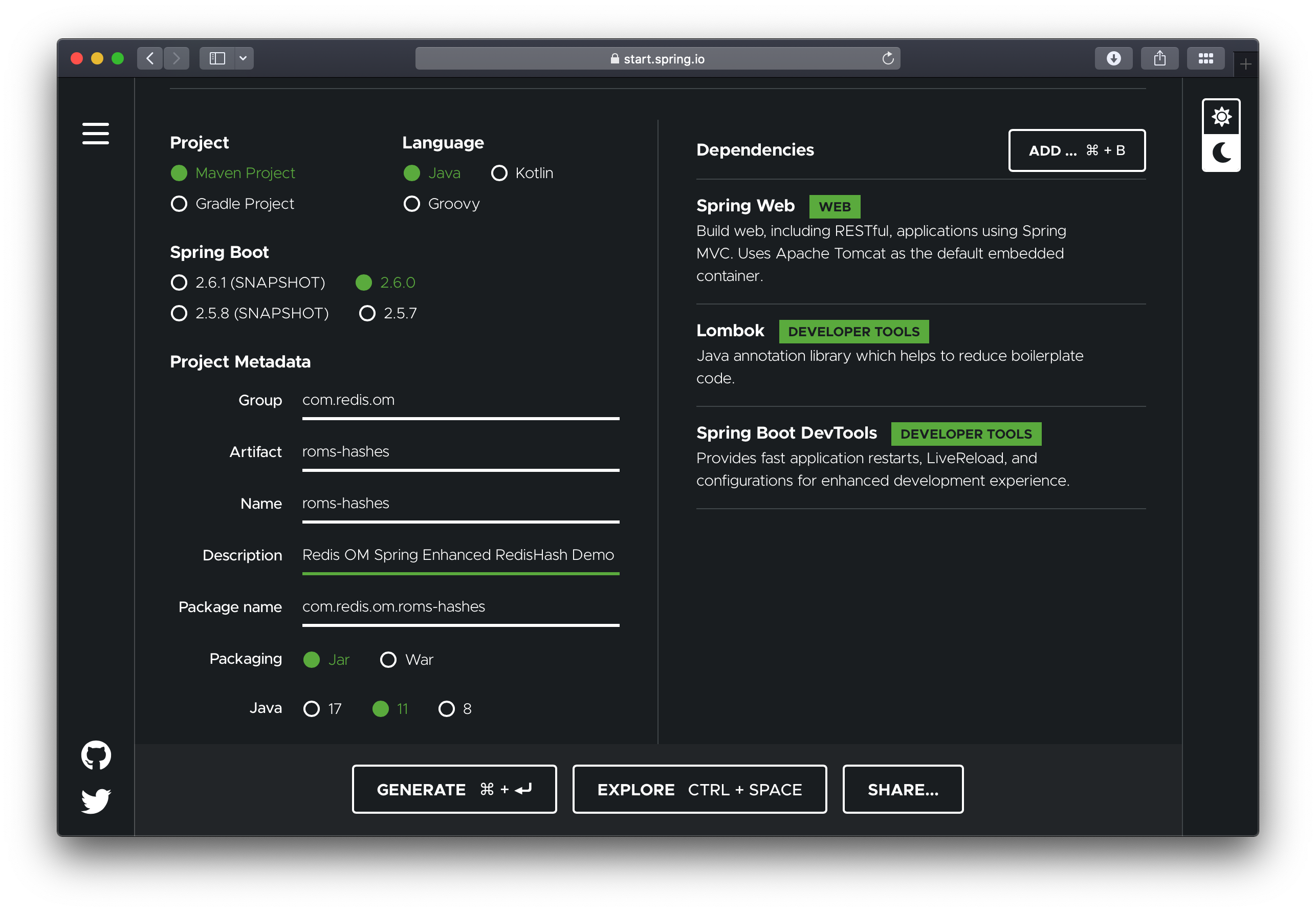
To configure the project:
- Navigate to https://start.spring.io. This service pulls in all the dependencies you need for an application and does most of the setup for you.
- Choose either Gradle or Maven and the language you want to use. This guide assumes that you chose Java.
- Click Dependencies and select Spring Web, Lombok and Spring Boot DevTools.
- Click Generate.
- Download the resulting ZIP file (
roms-hashes.zip), which is an archive of a web application that is configured with your choices.
The dependencies included are:
- Spring Web: Build web/RESTful applications using Spring MVC. It will allow us to expose our app as a web service.
- Lombok: Java annotation library which helps to reduce boilerplate code.
- Spring Boot DevTools: Provides fast application restarts, LiveReload, and configurations for enhanced development experience.
If your IDE has the Spring Initializr integration, you can complete this process from your IDE.
You can also fork the project from Github and open it in your IDE or other editor.
Adding Redis OM Spring
Maven
To use Redis OM Spring, open the pom.xml file and add the Redis OM Spring Maven dependency to the pom.xml file dependencies element:
<dependency>
    <groupId>com.redis.om</groupId>
    <artifactId>redis-om-spring</artifactId>
    <version>0.5.2-SNAPSHOT</version>
</dependency>
Please check the official Redis OM Spring GitHub repository for the latest version information
Gradle
If using gradle add the dependency as follows:
dependencies {
  implementation 'com.redis.om.spring:redis-om-spring:0.1.0-SNAPSHOT'
}
Enabling Redis Repositories
The generated application contains a single Java file, the @SpringBootApplication annotated main application.
To enable Spring Data Redis repositories, we also need to annotate the main or the configuration class with
@EnableRedisEnhancedRepositories as well as the @Configuration annotation.
package com.redis.om;

import org.springframework.boot.SpringApplication;
import org.springframework.boot.autoconfigure.SpringBootApplication;
import com.redis.om.spring.annotations.EnableRedisEnhancedRepositories;

@SpringBootApplication
@EnableRedisEnhancedRepositories(basePackages = "com.redis.om.hashes.*")
public class RomsHashesApplication {

    public static void main(String[] args) {
        SpringApplication.run(RomsHashesApplication.class, args);
    }

}
🚀 Launch Redis
Redis OM Spring relies on the power of Redis Stack.
The docker compose YAML file below can get started quickly. You can place at the root folder of your project and name it
docker-compose.yml:
version: '3.9'
services:
  redis:
    image: 'redis/redis-stack:latest'
    ports:
      - '6379:6379'
    volumes:
      - ./data:/data
    environment:
      - REDIS_ARGS: --save 20 1
    deploy:
      replicas: 1
      restart_policy:
        condition: on-failure
To launch the docker compose application, on the command line (or via Docker Desktop), clone this repository and run (from the root folder):
docker compose up
Let's also launch an instance of the Redis CLI so that we can spy on what ROMS is doing. To do so we'll launch Redis in monitor mode:
redis-cli MONITOR
Domain Entity
We'll have a single class in our application, the User class. We'll use lombok to avoid having to
create getters and setters. We'll use the lombok annotations @Data, @RequiredArgsConstructor and
@AllArgsConstructor.
Finally, to mark the class as a JSON document, we use the @Document annotation.
package com.redis.om.hashes.domain;

import org.springframework.data.annotation.Id;
import org.springframework.data.annotation.Reference;
import org.springframework.data.redis.core.RedisHash;
import org.springframework.data.redis.core.index.Indexed;

import com.redis.om.spring.annotations.Bloom;

import lombok.AccessLevel;
import lombok.AllArgsConstructor;
import lombok.Data;
import lombok.NoArgsConstructor;
import lombok.NonNull;
import lombok.RequiredArgsConstructor;

@Data
@RequiredArgsConstructor(staticName = "of")
@AllArgsConstructor(access = AccessLevel.PROTECTED)
@NoArgsConstructor
@RedisHash
public class User {
  @Id
  private String id;

  @Indexed @NonNull
  private String firstName;

  @Indexed
  private String middleName;

  @Indexed @NonNull
  private String lastName;

  @NonNull
  @Indexed
  String email;
}
We use Spring Data Redis @RedisHash annotation. The property named id is annotated with org.springframework.data.annotation.Id.
Those two items are responsible for creating the actual key used to persist the Hash in Redis.
The User class has a firstName, middleName and lastName, as well as an email property.
Creating a Repository
As with other Spring Data projects, Spring Data Redis provides the most common methods like save,
delete, or findById when you extend CrudRepository or PagingAndSortingRepository.
Let's create a basic repository under src/main/java/com/redis/om/hashes/repositories with the following contents:
package com.redis.om.hashes.repositories;

import java.util.List;
import java.util.Optional;

import org.springframework.data.repository.CrudRepository;
import org.springframework.stereotype.Repository;

import com.redis.om.hashes.domain.User;

@Repository
public interface UserRepository extends CrudRepository<User, String> {
}
Pre-populating the Database
Let's add a few User POJOs to Redis on application start-up by modify the RomsHashesApplication class
to include the newly created UserRepository using the @Autowired
annotation. Then we'll use a CommandLineRunner @Bean annotated method to create four User POJOs and
save them to the database.
In the CommandLineRunner we take the following steps:
- Use the repository
deleteAllmethod to clear the database (be careful with this is production! 🙀) - Create four
Userinstances; we'll use the four band members of Rage Against the Machine. - Use the repository
saveAllmethod to save allUserPOJOs in bulk.
package com.redis.om.hashes;

import java.util.List;

import org.springframework.beans.factory.annotation.Autowired;
import org.springframework.boot.CommandLineRunner;
import org.springframework.boot.SpringApplication;
import org.springframework.boot.autoconfigure.SpringBootApplication;
import org.springframework.context.annotation.Bean;
import org.springframework.context.annotation.Configuration;

import com.redis.om.hashes.domain.User;
import com.redis.om.hashes.repositories.UserRepository;
import com.redis.om.spring.annotations.EnableRedisEnhancedRepositories;

@SpringBootApplication
@Configuration
@EnableRedisEnhancedRepositories(basePackages = "com.redis.om.hashes.*")
public class RomsHashesApplication {

  @Autowired
  private UserRepository userRepo;

  @Bean
  CommandLineRunner loadTestData() {
    return args -> {
      userRepo.deleteAll();

      User john = User.of("Zack", "de la Rocha", "zack@ratm.com");
      User tim = User.of("Tim", "Commerford", "tim@ratm.com");
      User tom = User.of("Tom", "Morello", "tom@ratm.com");
      User brad = User.of("Brad", "Wilk", "brad@ratm.com");

      userRepo.saveAll(List.of(john, tim, tom, brad));
    };
  }

    public static void main(String[] args) {
        SpringApplication.run(RomsHashesApplication.class, args);
    }

}
Since we are using Spring Boot DevTools, if you already had the application running, it should have restarted/reloaded. If
not, use the mvn command to launch the application:
./mvnw spring-boot:run
If every goes as expected, you should see the familiar Spring Boot banner fly by:
[INFO] --- spring-boot-maven-plugin:2.6.0-M1:run (default-cli) @ roms-documents ---
[INFO] Attaching agents: []

  .   ____          _            __ _ _
 /\\ / ___'_ __ _ _(_)_ __  __ _ \ \ \ \
( ( )\___ | '_ | '_| | '_ \/ _` | \ \ \ \
 \\/  ___)| |_)| | | | | || (_| |  ) ) ) )
  '  |____| .__|_| |_|_| |_\__, | / / / /
 =========|_|==============|___/=/_/_/_/
 :: Spring Boot ::             (v2.6.0-M1)

2021-11-30 09:45:58.094  INFO 36380 --- [  restartedMain] c.r.o.d.RomsDocumentsApplication         : Starting RomsDocumentsApplication using Java 11.0.9 on BSB.lan with PID 36380 (/Users/bsb/Code/module-clients/java/high-level/redis-om/redis-om-spring/demos/roms-documents/target/classes started by briansam-bodden in /Users/bsb/Code/module-clients/java/high-level/redis-om/redis-om-spring/demos/roms-documents)
Where's our data?
If you were watching the Redis CLI monitor you should have seen a barrage of output fly by. Let's break it down and inspect it using another Redis CLI so as to understand the inner workings of the system.
Redis Search Indices
At the top you should have seen the FT.CREATE command which using the annotations in our POJO determined an
index recipe. Since our POJO is annotated with @Document we get an index ON JSON against any keys starting
with com.redis.om.documents.domain.Company: (which is the default key prefix for Spring Data Redis and also for ROMS):
1638336613.156351 [0 172.19.0.1:63396] "FT.CREATE" "UserIdx" "ON" "HASH" "PREFIX" "1" "com.redis.om.hashes.domain.User:" "SCHEMA" "firstName" "AS" "firstName" "TAG" "middleName" "AS" "middleName" "TAG" "lastName" "AS" "lastName" "TAG" "email" "AS" "email" "TAG"
ROMS uses the POJO fields annotated with @Indexed or @Searchable to build the index schema. In the case of the User POJO
we have the fields firstName, middleName, lastName and email are all annotated as "indexable",
meaning that we can do exact searches over these fields.
Spring Data Redis creates a SET to maintain primary keys for our entities, ROMS inherits this functionality from SDR. The DEL
command following the index creation is triggered because of the call to userRepo.deleteAll(); in our data loading method. If we
had any saved objects already we would also see calls to delete those individual instances.
For each of the User POJO we should see a sequence of REDIS commands like:
1638340447.180533 [0 172.19.0.1:63398] "SISMEMBER" "com.redis.om.hashes.domain.User" "01FNTB6JWTQHMK7NTEYA8725MP"
1638340447.198702 [0 172.19.0.1:63398] "DEL" "com.redis.om.hashes.domain.User:01FNTB6JWTQHMK7NTEYA8725MP"
1638340447.200874 [0 172.19.0.1:63398] "HMSET" "com.redis.om.hashes.domain.User:01FNTB6JWTQHMK7NTEYA8725MP" "_class" "com.redis.om.hashes.domain.User" "email" "zack@ratm.com" "firstName" "Zack" "id" "01FNTB6JWTQHMK7NTEYA8725MP" "lastName" "de la Rocha"
1638340447.203121 [0 172.19.0.1:63398] "SADD" "com.redis.om.hashes.domain.User" "01FNTB6JWTQHMK7NTEYA8725MP"
First SDR checks whether the object already exists in the Redis SET of primary keys using the SISMEMBER command. Then,
a DEL is issued to remove the Hash, following by a HMSET to write the new or udpated Hash. Finally, the id property
of the object is addded to the primary keys set using the SADD command.
Let's inspect the data using the Redis CLI. We'll start by listing the keys prefixed with com.redis.om.hashes.domain.User:
127.0.0.1:6379> SCAN 0 MATCH com.redis.om.hashes.domain.User*
1) "0"
2) 1) "com.redis.om.hashes.domain.User:01FNTB6JWTQHMK7NTEYA8725MP"
   2) "com.redis.om.hashes.domain.User:01FNTB6JZ2NSQNST3BBH1J1039"
   3) "com.redis.om.hashes.domain.User:01FNTB6JYP4X15EAF08YBK55WR"
   4) "com.redis.om.hashes.domain.User:01FNTB6JYXAZ6H7AJ9ZWHHW73H"
   5) "com.redis.om.hashes.domain.User"
We have 5 matches, one for each of the User POJOs created plus the Redis SET for the primary keys.
Let's inspect some of the values.
Let's check what type of data structure is stored in the com.redis.om.documents.domain.Company key:
127.0.0.1:6379> TYPE "com.redis.om.hashes.domain.User"
set
Knowing that it is a Redis SET, let inspect it's contents using the SMEMBERS command:
127.0.0.1:6379> SMEMBERS "com.redis.om.hashes.domain.User"
1) "01FNTB6JZ2NSQNST3BBH1J1039"
2) "01FNTB6JWTQHMK7NTEYA8725MP"
3) "01FNTB6JYXAZ6H7AJ9ZWHHW73H"
4) "01FNTB6JYP4X15EAF08YBK55WR"
The set contains all the Ids of our Users. Now, let's investigate the com.redis.om.documents.domain.Company:01FNRW9V98CYQMV2YAB7M4KFGQ key:
127.0.0.1:6379> TYPE "com.redis.om.hashes.domain.User:01FNTB6JWTQHMK7NTEYA8725MP"
hash
The Redis datatype stored is a hash (a Redis Hash). Let's check its contents using the HGETALL command:
127.0.0.1:6379> HGETALL "com.redis.om.hashes.domain.User:01FNTB6JWTQHMK7NTEYA8725MP"
 1) "_class"
 2) "com.redis.om.hashes.domain.User"
 3) "email"
 4) "zack@ratm.com"
 5) "firstName"
 6) "Zack"
 7) "id"
 8) "01FNTB6JWTQHMK7NTEYA8725MP"
 9) "lastName"
10) "de la Rocha"
Querying
ROMS most compelling feature is the ability to create repository implementations automatically, at runtime, from a repository interface.
Let's start with a simple method declaration in UserRepository that will find a unique instance of User given
their lastname.
package com.redis.om.hashes.repositories;

import java.util.Optional;

import org.springframework.data.repository.CrudRepository;
import org.springframework.stereotype.Repository;

import com.redis.om.hashes.domain.User;

@Repository
public interface UserRepository extends CrudRepository<User, String> {
  Optional<User> findOneByLastName(String lastName);
}
ROMS uses the method name, parameters and return type to determine the correct query to generate and how to package and return a result.
findOneByLastName return an Optional of User this tells ROMS to return a null payload if the entity is not found. The findOne part
also reinforces that even if there are multiple results we are only interested in getting one. ROMS parses the method name
to detemined the number of expected parameters, the ByLastName portion of the method tell us we expect 1 single parameter named lastName.
Testing Controller
Let's create a REST controller to test the findOneByLastName method. Create the UserController under the package
com.redis.om.hashes.controllers as shown:
package com.redis.om.hashes.controllers;

import java.util.Optional;

import org.springframework.beans.factory.annotation.Autowired;
import org.springframework.web.bind.annotation.GetMapping;
import org.springframework.web.bind.annotation.PathVariable;
import org.springframework.web.bind.annotation.RequestMapping;
import org.springframework.web.bind.annotation.RestController;

import com.redis.om.hashes.domain.User;
import com.redis.om.hashes.repositories.UserRepository;

@RestController
@RequestMapping("/api/users")
public class UserController {

  @Autowired
  private UserRepository userRepository;

  @GetMapping("name/{lastName}")
  Optional<User> byName(@PathVariable("lastName") String lastName) {
    return userRepository.findOneByLastName(lastName);
  }

}
In our controller, we include our UserRepository and create simple method to respond to a GET request at
/api/users/name/{lastName} where {lastName} would be the string parameter we are passing as the lastName to find.
Let's test the endpoint using CURL and passing the exact company name Redis:
➜ curl --location --request GET 'http://localhost:8080/api/users/name/Morello'
{"id":"01FNTB6JYXAZ6H7AJ9ZWHHW73H","firstName":"Tom","middleName":null,"lastName":"Morello","email":"tom@ratm.com"}
Let's format the resulting JSON:
{
  "id": "01FNTB6JYXAZ6H7AJ9ZWHHW73H",
  "firstName": "Tom",
  "middleName": null,
  "lastName": "Morello",
  "email": "tom@ratm.com"
}
Inspecting the Redis CLI MONITOR we should see the query issued:
1638342334.137327 [0 172.19.0.1:63402] "FT.SEARCH" "UserIdx" "@lastName:{Morello} "
Let say that we wanted to find Users by the combination of lastName and firstName, we could add
a query declaration to the repository interface like:
List<User> findByFirstNameAndLastName(String firstName, String lastName);
In this case method findByFirstNameAndLastName is parsed and the And keyword is used to determine that
the method is expecting 2 parameters; firstName and lastName.
To test it we could add the following to our controller:
@GetMapping("/q")
public List<User> findByName(@RequestParam String firstName, @RequestParam String lastName) {
  return userRepository.findByFirstNameAndLastName(firstName, lastName);
}
Using CURL to test we
➜ curl --location --request GET 'http://localhost:8080/api/users/q?firstName=Brad&lastName=Wilk'
[{"id":"01FNTE5KWCZ5H438JGB4AZWE85","firstName":"Brad","middleName":null,"lastName":"Wilk","email":"brad@ratm.com"}]
Formatting the resulting JSON we can see the record for Brad Wilk is returned as the only element of the JSON Array result:
[
  {
    "id": "01FNTE5KWCZ5H438JGB4AZWE85",
    "firstName": "Brad",
    "middleName": null,
    "lastName": "Wilk",
    "email": "brad@ratm.com"
  }
]
Back on the Redis CLI monitor we can see the query generated by our repository method:
1638343589.454213 [0 172.19.0.1:63406] "FT.SEARCH" "UserIdx" "@firstName:{Brad} @lastName:{Wilk} "
Redis OM Spring, extends Spring Data Redis with search capabilities that rival the flexibility of JPA queries by using Redis' native Search and Query engine.